Hello. We are the Security Development Division (LINE Plus Security R&D) team, working to integrate AI into internal security operations.
This is the first part of a series covering the technical and operational perspective of SAGE, an AI agent platform for cyber security that we run internally. I have summarized design decisions and operational practices that may be useful for security teams considering AI adoption in the security domain.
Before diving in, I will briefly explain the direction we are taking.
Discussions about introducing AI into security work often lean toward two extremes. One approach tries to build a fully autonomous agent that judges by itself with no human intervention from the start. In practice that approach often shows limitations. Plausible but inaccurate answers can become the basis for wrong decisions, which is far more critical in security than in many other domains. The other approach delays adoption because the risks seem large. That delay leaves staff to continue repetitive work of finding scattered rules and past cases by hand.
We chose a middle path: start by helping prepare human judgments rather than replacing them, and expand gradually. We designed a three-step adoption process as follows.
- Step 1 - Assist human judgment: AI performs initial organization and evidence gathering, while responsible decisions such as security judgments and exception approvals remain with humans.
- Step 2 - Agent collaboration: Multiple agents share roles and gradually reduce areas that require direct human work.
- Step 3 - Automate structured work: Automate well-validated, regular tasks first to minimize human intervention.
These steps are not strictly separable. Inside SAGE we have already begun experiments where multiple agents collaborate in limited scopes or where some structured tasks are automated. In this article I focus on step 1, where AI helps prepare judgments without replacing human decision making.
The idea of autonomous agents is attractive. However, in real complex work human intervention often becomes necessary, and we observed the limits of autonomy. That observation led to the three-step adoption process above. We stabilize step 1, which works in practice, and expand only after sufficient verification. The remainder of this article describes our current structure and operations where humans and AI work together.
For clarity, the answer formats, operational rules, and verification stages discussed here paraphrase the intentions of the actual system. Actual internal component names, original prompts, specific policy document titles, and operational figures are intentionally generalized for security reasons.
The barriers when applying AI to security work
"Can we upload this data to an external service?"
The process of answering this type of question in a security team usually hides checks such as the following.
- Identify what the data is (information classification), where it goes (external transfer, cross-border transfer, outsourcing), and what is being used (generative AI, external SaaS), and then check different policy clauses accordingly.
- Check how similar past consultations were resolved.
- Check operational team knowledge such as "common rejection reasons recently" or "this message is actually caused by another factor" , because those are clues for the answer.
The problem was that these materials are scattered across systems and domains. Internal policies and guides are in Confluence, past consulting records and factual history are in Jira tickets, and accumulated operational know-how is in Slack history and people’s heads. To answer a single inquiry, a person had to move across many sources, causing large variance in answer quality and response time depending on the staff member’s experience.
The following figure simplifies how a security consultation is processed over time. The stages labeled "staff" are the parts that require human time.

Our goal was simple. Make it easier and safer for people to handle these stages. This is not about AI automatically producing a one-line answer. It is closer to making a colleague that completes the initial organization up to the point just before a human answers.
More specifically, SAGE aims to do the following.
- At the current stage, rather than generating official judgments or final answers, automate initial material organization and evidence gathering so staff can respond quickly.
- In fast-response contexts such as Slack channels, AI provides safe initial guidance to reduce response gaps.
- AI identifies additional information needed to reduce extra confirmation rounds between staff and requesters.
- As a result, reduce variance in answer quality and response time caused by differences in staff experience, and let requesters get more consistent, faster responses.
- Quickly tell both requesters and staff which materials and policies to look at.
This article explains the three SAGE entry points created to achieve these goals: the security consultation assistant (Jira-based), the security operations guidance assistant (Slack-based), and the security analysis workbench (staff web); how we built each, and how we operate them.
What is SAGE? An overview of the system
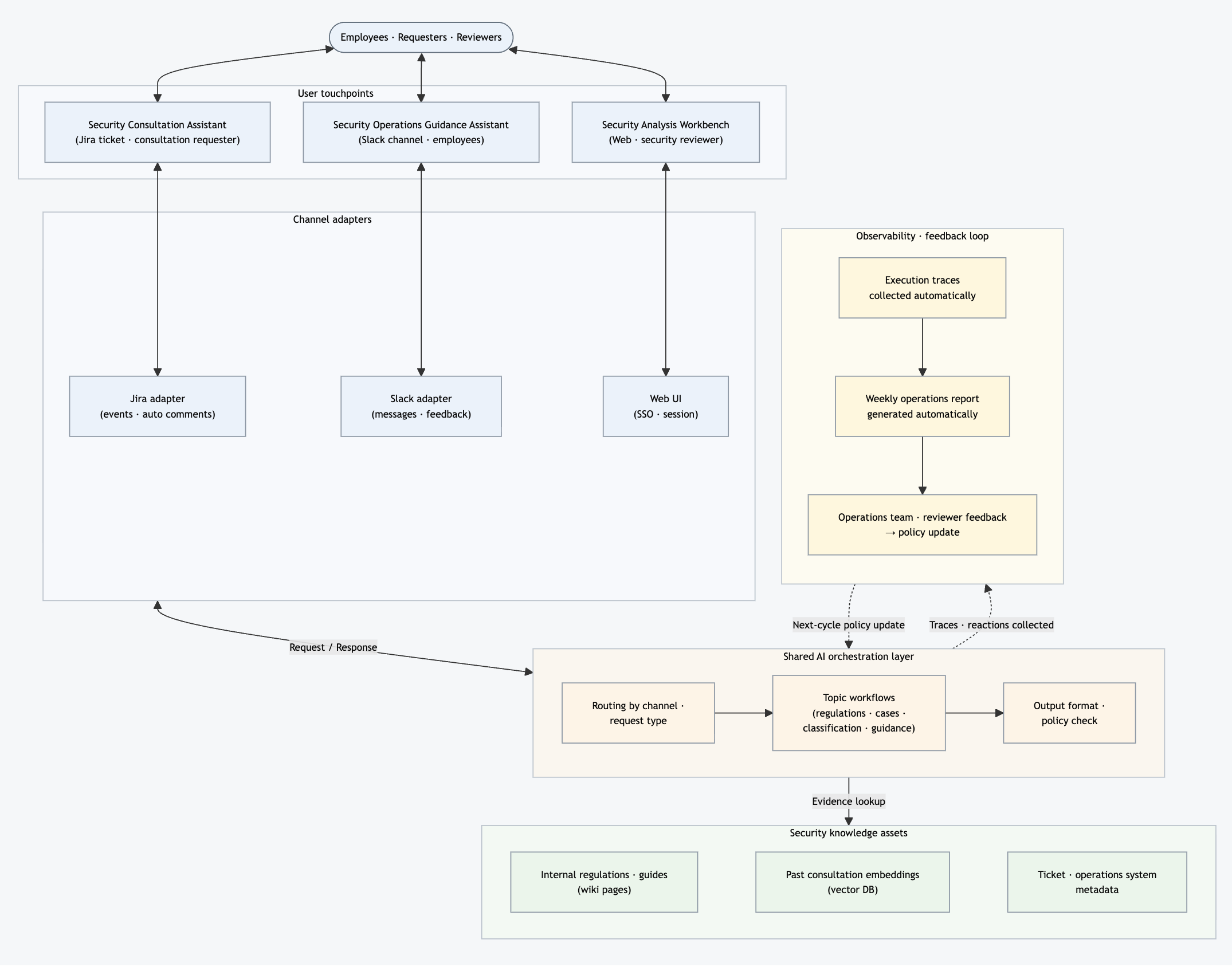
SAGE is not a single chatbot. It is a platform where three entry points share the same security knowledge assets and a common AI orchestration layer. Each entry point differs in "when it runs," "where the answer appears," and "what form the answer takes." Each entry point’s workflow is not a single monolithic AI agent but a multi-agent workflow where a dedicated AI agent handles each subtask.
Platform architecture
Comparing the three entry points
The following table compares the characteristics of the three entry points.
| Item | Security consultation assistant (Jira-based) | Security operations guidance assistant (Slack-based) | Security analysis workbench (staff web) |
|---|---|---|---|
| Operational stage | In production | In production | In production |
| Trigger | Ticket creation or comment events | Channel messages | Initiated directly by staff |
| Primary users | Requesters and security consulting staff | Internal employees and security operations staff | Security staff (information security manager (ISM) and operations); some functions are expanding to all employees |
| Answer location | Ticket comments | Slack threads | Web UI result panel |
| Purpose of answer | Provide evidence, viewpoints, and checklist items for security consultation | Provide safe initial guidance for users | Analysis tool for staff |
| Direct user exposure | Exposed as an automatic comment on the ticket | Exposed as an automatic message in the Slack thread | Visible only to the user who ran it |
| Human review method | Automatic comment followed by staff review | Automatic post followed by follow-up review if needed | Staff run and review directly |
| Answer responsibility boundary | Reference suggestions for staff (not an official judgment) | Reference guidance for users (not an official judgment) | Analysis results for staff review |
The most important row in this table is the answer responsibility boundary. The security consultation assistant places organized materials on the desk before a staff member writes an answer. The security operations guidance assistant provides safe initial guidance when staff cannot respond immediately. The security analysis workbench is an analysis tool used when staff run the workflow themselves.
Although the exposure methods differ, the purpose is the same. The goal at this stage is not to replace staff. It is to gather materials and complete initial organization before staff touch the case, and when staff cannot respond immediately provide guidance that lets the user start the next action. This helps staff answer and review more quickly, consistently, and with higher quality.
Technology stack at a glance
Here is what each area of the architecture is actually built with.
| Area | Technology / tool | Role |
|---|---|---|
| AI workflow orchestration | Langflow | Low-code AI agent workflow composition and execution |
| Generative models (LLM) | GPT family (OpenAI) | Intent classification, reasoning, and answer generation for AI agents |
| Observability and traces | Langfuse | Store execution traces and serve as data source for weekly operational reports |
| External system integration (tool calls) | Model Context Protocol (MCP), including Atlassian tools | Expose Jira and Confluence read/write operations and real-time retrieval of original policy and guide text as tools to AI agents |
| Vector search (retrieval-augmented generation (RAG)) | OpenSearch vector store + embedding model | Embedding index for past consultations and operational know-how |
| Internal knowledge sources | Confluence wiki and Jira tickets | Policy and guide texts and consultation history |
| Workbench backend | FastAPI | REST API, UI router, and Langflow proxy |
| Workbench frontend | htmx-based web UI | Server rendering with partial updates |
| Session and shared storage | In-memory key-value store | Session and shared data storage |
Actual inference and answer generation are handled by GPT family models (OpenAI). We choose model size and reasoning effort per workflow depending on difficulty and cost. For light classification and normalization we use smaller models. For policy interpretation and complex consultation summaries we use larger models and higher reasoning effort.
In this setup, Langflow composes and runs workflows, GPT models handle reasoning and response generation, Langfuse observes execution, and MCP connects external systems such as Jira and Confluence as callable tools for AI agents. OpenSearch, Confluence, and Jira are knowledge sources for past consultations, policies, and operational know-how. The next chapters explain how each entry point combines these tools at the workflow level.
Security consultation assistant (Jira-based): Support first review of consultation tickets
The problem we wanted to solve
The security consultation assistant has the most carefully designed workflow among the three entry points because consultation tickets are the longest and most complex inputs from a system perspective.
An average security consultation ticket looks like this.
- The body itself is long. It lists items such as the requesting department, data fields, whether external transfer is involved, schedule, and attachments.
- The comment thread may contain information corrections. Initial information can be corrected in comments or new conditions for the same question may be added.
- Reference links (other ticket numbers, wiki URLs, etc.) appear in the body and in comments.
Before writing an answer, the staff member (usually a security staff in the information security manager (ISM) role) typically performs the following steps.
- Reread the ticket body and comments
- Search for similar past consultations
- Recall relevant policy clauses
- Organize what additional information is needed
- Combine gathered evidence with professional judgment, analyze, and decide how to answer
The security consultation assistant’s purpose is to finish the laborious steps 1-4 (reading, searching, gathering evidence, and organizing) automatically. The most important step 5 (analyzing and making a judgment from the evidence) remains with the staff. In other words, it does not write the answer for the staff. It ensures the staff has "already organized materials" when they start analysis and judgment.
The security consultation assistant has now been officially released internally and is in production. Automatic comments are posted on production tickets, but all outputs assume staff review. We periodically collect user feedback from security consultation staff through an internal survey channel and use it to gradually improve answer policies and workflows.
How it works: The ticket processing flow
Viewing the sequence of who interacts with a ticket and in what order, the flow looks like this.
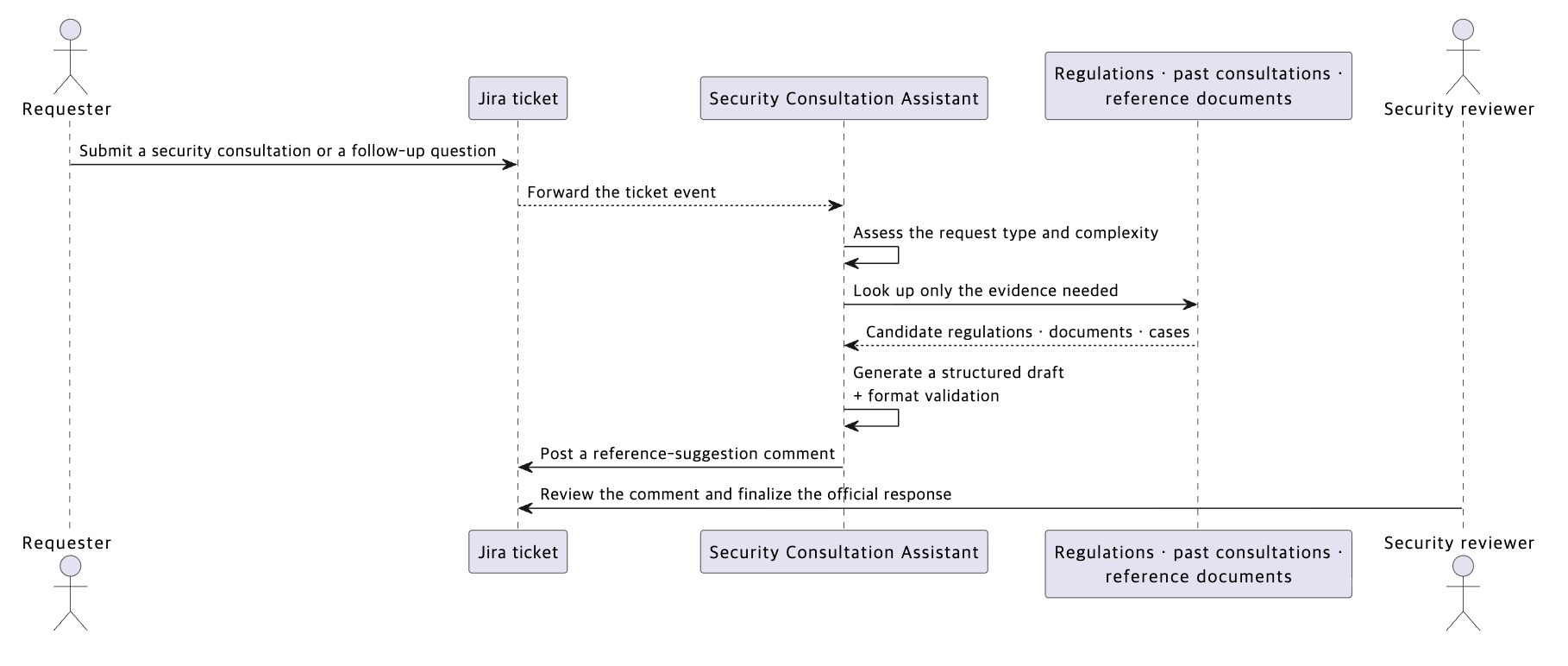
Internally the consultation assistant is not a single large AI agent. It is a multi-agent flow where separate AI agents handle each step. The flow can be summarized in five main stages.
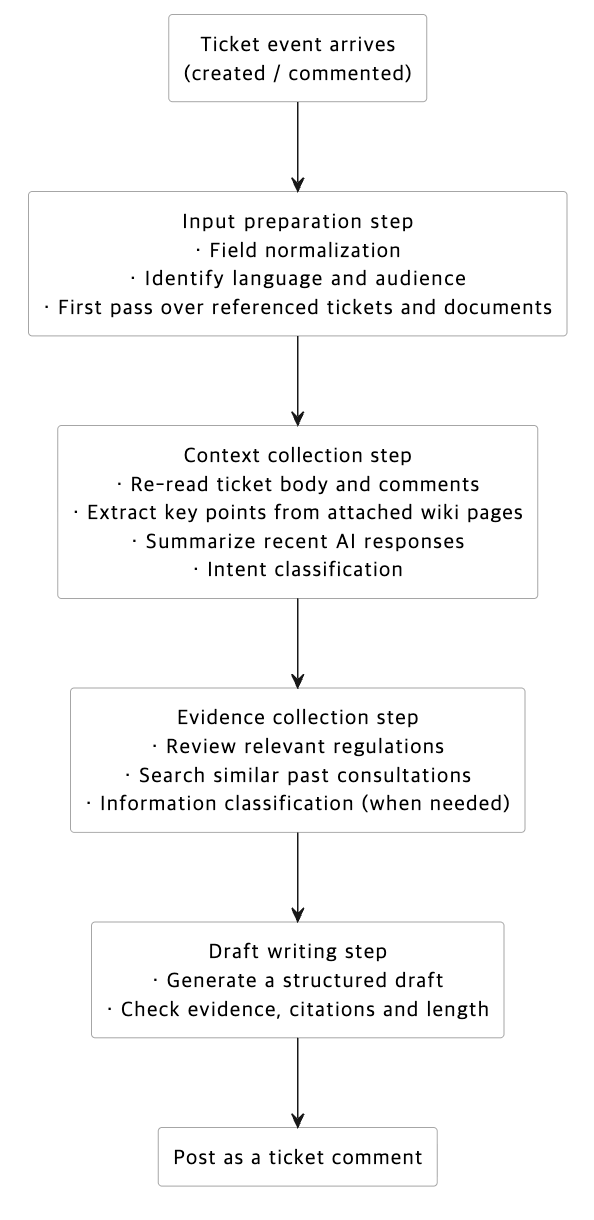
The evidence collection stage contains four helper workflows, each called under different conditions.
| Helper workflow | When it is called |
|---|---|
| Policy review | Called if any policy axis such as external transfer, cross-border transfer, or outsourcing applies |
| Similar past consultation search | Called only when comparing cases is likely to actually reduce staff judgment work |
| Information classification assessment | Called only when disputes about information classification are a core issue |
| Citation strengthening | Called only at the answer finalization stage when needed after initial evidence is gathered |
AI answer policy
To keep outputs easy for staff to review, we defined policies for answer format, length, and how to handle evidence.
AI comments are reference suggestions, not answers
In security consultations, it is most dangerous for AI to make plausible definitive statements. Therefore the consultation assistant’s comments follow a separated block structure as described below.
| Category | What the AI agent organizes |
|---|---|
| Points to check first | Issues staff should prioritize in the current inquiry |
| Risks | Aspects that could be problematic based on the current entry |
| Judgment perspectives | Judgment axes such as policy, data flow, outsourcing, and use of external services |
| Missing information | Additional information needed before answering |
| Staff actions | Specific tasks staff should confirm, compare, or reconsult |
| Reference evidence | Related policies, documents, and supporting evidence from past consultations |
There are two intentions behind the block structure.
- First, to let staff find the same kinds of information in the same place for any ticket. If answer formats vary, staff will end up reorganizing them again.
- Second, to prevent models from creatively inflating answer length.
We also explicitly ban expressions that would let AI produce conclusions.
- Definitive judgments such as "This is allowed" or "This is not allowed"
- Expressions that make AI sound like an operational staff member, such as "Received," "I will handle it," or "Reviewed"
- Policy interpretation based on arbitrary guesses
The reason for explicitly banning such expressions is simple. The moment an AI comment appears to be an "official staff answer," the boundary of human responsibility becomes ambiguous. Fixing the principle that "AI organizes, gathers evidence, and guides next actions while humans always make the final judgment" in how outputs are phrased makes a human-in-the-loop operation possible. In the consultation assistant, AI outputs must pass staff review, editing, and approval before becoming official answers.
Change answer form based on complexity
The consultation assistant gauges the consultation’s complexity first and then adapts answer depth and length accordingly.
Complexity is not assigned by human intuition. We define various review axes that make a consultation difficult in security; such as data flow, external exposure risk, contract and operational structure, and ambiguity in information classification, and check which axes apply. We combine the checks into a simple internal value to decide whether the case is simple, medium, or complex. Specific axes, weights, and thresholds belong to operational policy and are abstracted here.
The three answer levels differ roughly as follows.
- Simple: briefly list the points staff should check first and one or two initial staff actions
- Medium: include the above plus blocks for risks, judgment perspectives, and additional information to request
- Complex: include the above plus preconditions, additional consultation triggers, candidate reference documents, and reinforcement with similar cases
Two commitments are embedded in this design.
- We intentionally keep answers short for simple consultations. A long, elaborated answer for a simple single-category request can make staff miss the core and reread the body.
- Ambiguous cases are classified into the lower complexity. If a case falls on the border between medium and complex, we classify it lower. We judged that it burdens staff more for AI to mistakenly label a case as complex and generate overly long answers than to label it simple and produce a short answer.
Only show verified citations
Security answers gain trust when users can see which document and which sentence support the claim. Therefore, we do not attach evidence candidates gathered in the first review directly to answers. Instead, we compare candidates with the original wiki text and mark only verified citations. Candidates that do not match the original text are not shown as definitive citations. For the comparison, we query the original texts in real time through MCP rather than using embedded copies. (Embedding searches are used for past consultations and operational know-how.)
When multiple pieces of evidence conflict, we apply stricter ordering: prohibited → conditional → requires additional confirmation → no special issues. The intent is to reduce situations where AI asserts "It is okay" and staff later have to correct it to "It is not okay."
Example processed result in a hypothetical scenario
To aid understanding, we present a de-identified, realistic consultation case.
Consultation: A department requested system integration to automatically fetch dashboard data daily and load it into an internal analysis database. The data does not leave the company, but it is classified above a certain internal confidentiality threshold. They asked whether it is acceptable to connect internal systems in this way.
The consultation assistant rated this case as medium complexity and provided the following initial organization.
- Points to check first: Connecting internal systems itself is not blocked, but you must confirm communication requirements and controls on the data sink such as access permissions, retention periods, and granting only necessary privileges.
- Potential risks: Without an architecture diagram, data flow, and item list, it is hard to confirm how things change. If the data later flows into external generative AI, that is a separate topic from internal integration and must be checked separately.
- Additional information required: Where each system is located and how they communicate and encrypt, the data retention and deletion policies and access logging, and whether there is any configuration that would feed or reference this data in external AI.
- Reference evidence (policy, guide links + original quote): For each item above, provide links to relevant internal policies, detailed guidelines, and candidate documents from which exact quoted sentences were taken. This allows both the staff writing the answer and the requester to verify sources directly and jump to the necessary documents.
- Next staff actions: Prepare an architecture diagram, document communication paths and encryption, list database access subjects, and summarize retention, deletion, and least-privilege design for confirmation with the requesting department if needed.
As you can see, the consultation assistant does not say "This is allowed" or "This is not allowed" . It separates what can be confirmed from the current information and what needs further checks before answering. For example, it asks "Does this data flow into external AI" ? — a condition the user did not state but that can change the conclusion — and helps staff avoid missing such points.
Continuous improvement through regular feedback
We provide a separate channel where security consultation staff can comment on automatic replies from the assistant. Even after the official release, staff continue to provide regular feedback through an internal survey channel on items such as the following.
| Feedback item | What to look at |
|---|---|
| Useful parts | Which answer blocks actually helped in real review |
| Missing parts | Which blocks were empty or incorrectly identified |
| Citation accuracy | Whether cited policies and cases were actually relevant |
| Missing judgment axes | Whether the AI agent missed any review axes it should have marked |
| Free comments | Other improvement suggestions |
We review staff feedback and when a pattern is repeatedly pointed out we convert it into an answer policy rule. The accumulated rules are applied in the next cycle and we verify the result in the subsequent survey. This cycle helps us iteratively improve policies and workflows.
Security operations guidance assistant (Slack-based) — first guidance for operations channels
While the consultation assistant handles long and complex inputs, the operations guidance assistant handles short inputs that require an immediate response.
Channel characteristics and assistant purpose
The operations guidance assistant is currently running in the internal security operations inquiry channel. This channel’s characteristics are as follows.
- It gathers user inquiries about endpoint security, authentication, external storage, VPN, and similar operational security tools.
- The channel is public. Any user can post or view replies.
- Response time defines user experience. If staff cannot reply immediately, response gaps easily occur.
The operations guidance assistant's role in this channel can be summarized in one sentence.
"Before staff respond, provide initial guidance so the user can safely take the next step."
The guidance is not meant to conclude the case. It aims to help users gather additional information, attempt safe initial measures, or find the right staff to contact. By reducing user wait time when staff are absent, and by providing the staff with preliminary information when they return, the assistant accelerates resolution.
How it works
The workflow in the operations channel is also split into two agents: one dedicated to search and one to compose guidance. We describe each step below.
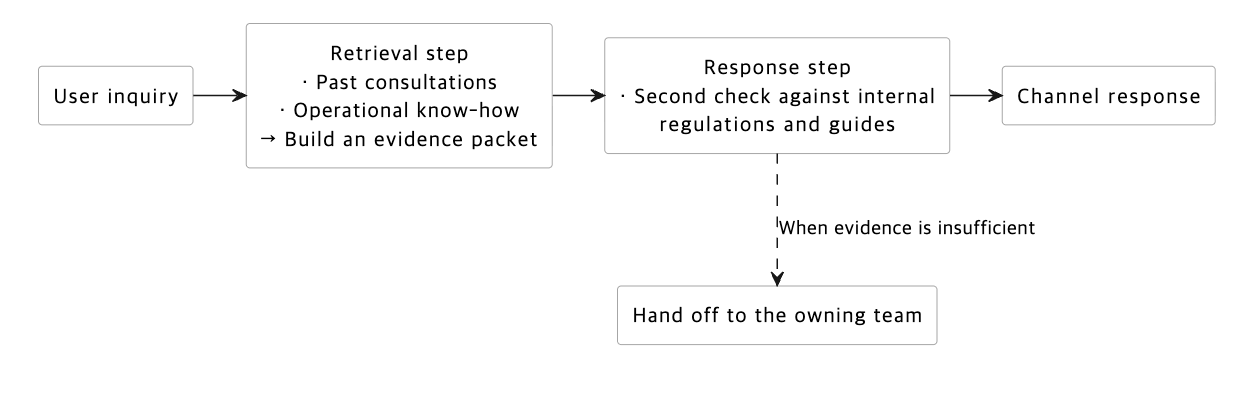
When a user posts, we first gather items such as "points to precheck for this case" , "frequently appearing correct patterns" , and "safe immediate actions" from internal operational know-how and past consultation embeddings. This stage does not produce a final answer. Instead it produces a bundled information packet ("evidence packet") containing classification, evidence, safe immediate action candidates, and likely causes, which is passed to the next step.
Next, we verify the evidence packet against internal policies and guides and then draft the user-facing initial guidance. Internal policies are the primary evidence for guidance, and operational know-how serves to strengthen that evidence. If verification fails, the flow automatically switches to "general guidance + route to staff" . "Route to staff" means mentioning the appropriate team so a human takes over instead of AI making an official judgment.
This separation prevents operational know-how from being injected directly as definitive content in user replies. To include content definitively in an answer, a corresponding internal policy paragraph must exist.
AI answer policy
The channel’s answer policy defines what to respond and how, and is continuously updated with operational feedback.
Do not be fooled by surface symptoms
The most common trap in this channel is that surface symptoms and actual causes differ. If a user writes "VPN is not working" , do not automatically go into VPN troubleshooting. The real cause might be the endpoint security solution state, MDM registration status, or account status.
The operations guidance assistant is designed to separate surface symptoms from root causes. The policy’s main principles are as follows.
| Situation | What to avoid | What to prioritize |
|---|---|---|
| Cases where the surface symptom may not be the cause | Simple keyword-based routing | Separate real causes such as endpoint security and authentication status before routing |
| General troubleshooting | Listing broad checklists | One next action that directly helps the given case |
Answers follow four parts: greeting, body, optional reference documents, and a caution note ("AI guidance only and not an official judgment or approval") . Replies are written only in the same language as the inquiry. Korean inquiries are answered in Korean, Japanese in Japanese, and English in English.
Design the system so the development team can continuously reflect operations feedback
One key decision we made when building SAGE is to avoid assuming that the system is "done once the development team prepares prompts." Instead, operation teams review accumulated cases weekly, identify problem patterns and ideal guidance directions, and the development team continuously reflects those in a separate answer policy area.
The operation team, who best know the real context and ideal replies, summarizes repeated case rules in operational language and passes them to development. For example, abstracted rules may include:
- If a user reports that an external storage device request was rejected, suspect host name or serial number typos before checking the rejection reason.
- Even for VPN connection failures, if a specific endpoint security tool state appears as a hint, do not route to general helpdesk; instead provide reinstallation instructions for that tool first.
- Guidance for authentication tool device changes or loss should direct users to a different request form than other cases.
When the operation team organizes repeated failure patterns and improvement guides into operational language and passes them to development, the development team safely incorporates them into system prompts and answer policy rules. They modify or disable only the rule section rather than editing global system prompts. This approach lets us apply small, focused fixes such as "If the same mistake repeats five times this week → do not reply that way from next week."
The key is to change a small section without rewriting the entire answer policy. Rewriting the whole policy risks unintended side effects. Isolating changes to one-line rules narrows the impact. This provides a fast feedback loop: operation team identifies a problem → development reflects the rule → check next cycle responses.
A weekly improving feedback loop
At the bottom of Slack replies users see buttons like "helpful" and "not helpful" . When a user clicks them, the feedback loop starts.
This feedback loop is a human-in-the-loop review where humans are essential for quality improvement. Unlike the consultation assistant where AI outputs require staff review before official answers, here the initial guidance is automatically posted. Therefore we do not review each posted reply individually; instead we periodically review posted replies and reflect findings in answer policy. We automatically collect and aggregate AI replies and user reactions so the operation team can review complex or low-quality cases and update answer policy.
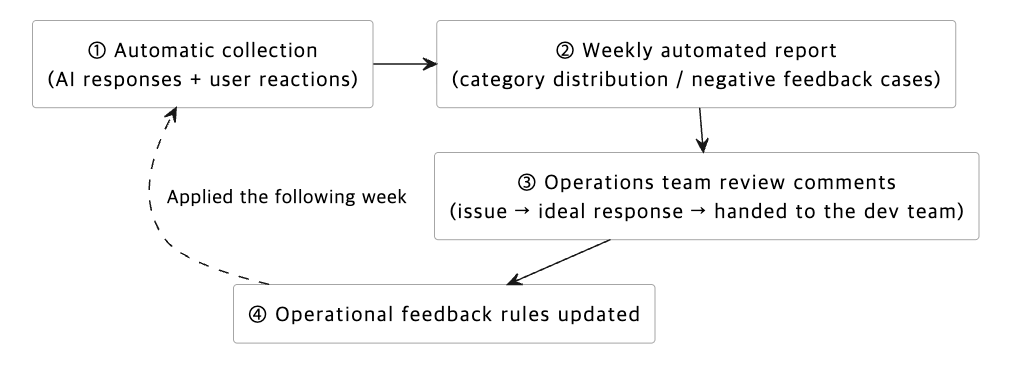
| Stage | Who | What is produced |
|---|---|---|
| ① Collection | System (automatic) | All AI replies and user reactions (👍 / 👎 / no reaction) and staff click traces are stored in the observability tool |
| ② Report | System (automatic, weekly) | A weekly markdown report summarizing observed counts, category distribution, and inputs, outputs, and evidence for negative feedback cases |
| ③ Review | Operation team | For each negative feedback case, write three comments: ⓐ identified issues, ⓑ ideal initial guidance, ⓒ improvement guide to pass to development |
| ④ Reflect | Development team | Update answer policy rules based on the comments so that next week similar cases are answered differently |
Security analysis workbench (staff web) — staff-run analysis tools
While the consultation and operations assistants are event-triggered reactive systems, the security analysis workbench is a staff-driven analysis tool that staff run when they choose a workflow.
Who uses it and when
The analysis workbench is a web UI used by internal security staff (ISM and others). It integrates with internal authentication so only authorized staff can access it.
Its distinctive feature is that the trigger is a person. Staff select and run workflows at the moment they decide, rather than waiting for channel messages or ticket events.
Four workflows
The workbench currently includes four workflows.
| Workflow | What it does |
|---|---|
| Confidentiality classification assessment (information classification) | Propose candidate classifications for input data or documents according to internal confidentiality criteria |
| Similar case search | Find and compare past consultation tickets similar to the input |
|
Policy and process guidance | Ask in natural language, for example "Which policy applies in this case?" and receive a conclusion with the supporting policy sentences quoted exactly |
| Third-party security compliance check | Review whether a partner meets the security requirements for joint work and summarize areas that need remediation or additional review |
We did not force all four workflows into one chatbot UI. We separated them into distinct tools because input and output shapes differ. For example, confidentiality classification expects short text input, while third-party compliance checks may require long documents and a different result view.
These four are not the end. We plan to design and add new tools as the field requires.
Operating model — built and run across multiple departments
This section shifts from system topics to people topics.
Core team and collaborating departments
The Security Development Division is responsible for the current workflows, channels, tool implementation, and infrastructure operation.
Collaborating security departments vary by entry point and workflow. Because each department uses different policies, answer tone, and evidence documents, we did not create a single rule that applies everywhere. Instead we keep separate rule sets per business line and reflect operation team improvement guides into those sets.
AI and human role separation
All three entry points share the principle that AI does not make official judgments, but the exposure method differs. Therefore we did not adopt a single standard operating model. We defined responsibility models by entry point.
| Entry point | What AI (SAGE) does | What humans (staff) do | Responsibility boundary |
|---|---|---|---|
| Security consultation assistant | Read tickets, gather relevant policies, cases, and missing information, and post reference suggestion comments for staff | Review comments and write and finalize official answers according to department policy | AI comments are reference suggestions for staff, not official judgments |
| Security operations guidance assistant | Post user-facing initial guidance in Slack threads according to fixed response principles, and escalate to the responsible team when evidence is insufficient | Take over the thread when necessary to correct, supplement, and finalize handling | AI guidance is not an official judgment or approval |
| Security analysis workbench | Provide analysis results, evidence, and candidates on the screen according to the workflow the user selects | Review results and use them in real operational judgments | The output is reference material for the executing user; responsibility for judgment remains with the user |
| Feedback loop | Aggregate user reactions, execution traces, and survey feedback into reports | Operation team identifies problem patterns and ideal answers and development reflects them as answer policy rules | Policy updates are applied after operation review and technical implementation |
The operating principles are simple.
- We do not replace human judgment at the current stage. The goal is to reduce the initial organization time staff spends before starting an answer and to provide safe initial guidance within defined limits when staff cannot respond immediately.
- We avoid definitive statements. Every automatic reply states it is a reference suggestion or guidance and does not replace official judgments or approvals.
- We look at patterns rather than raw numbers. Weekly counts and feedback ratios are useful, but we focus more on patterns such as "which kinds of replies require the most staff intervention." Patterns can be converted into rules, while raw ratios are harder to use directly.
What we learned
We summarize four lessons from building and operating SAGE. These are not universal truths. Answers may differ depending on data, processes, and responsibility boundaries. They are choices that fit our situation.
Divide by domain workflows rather than a universal chatbot
Putting all questions into one AI agent can make answers sound plausible, but our experience showed it blurs responsibility and evidence priorities. We split security consultation, operations inquiries, information classification, process guidance, and policy review into separate workflows. This proved more stable for us. When a new security team or case joins, we can attach a new workflow without changing existing ones. Good separation prevents one policy change from unintentionally affecting other answers.
Let AI point out what to check rather than assert answers
The most dangerous thing in security is AI producing plausible conclusions with insufficient information. We instruct AI to say "I cannot judge now" when necessary and simultaneously indicate "what materials, policies, and information to check." At this stage, a good answer helps humans continue final judgment by organizing evidence and check items rather than making the conclusion for them.
Search quality depends more on material organization and indexing than on the model
From our experience, RAG-based agent answers depended more on how well source materials were organized and structured for search than on model intelligence. The same model can find accurate evidence if policies, guides, past cases, and operational manuals are well organized for search. Otherwise it may pull irrelevant documents or stop at "no evidence."
Preparing source materials is work outside models and workflows. Responsible departments continuously curate and keep materials up to date. On top of that foundation we make those materials easier for AI agents to find by doing things such as the following.
- Index high-level branches in advance when needed. Having a top-level index like "which kinds of questions map to which policy or document sets" guides search before diving into detailed documents.
- Embed additional context such as processing history and context scattered across documents so that questions not matching the exact document phrasing still retrieve relevant evidence.
This work never ends. Materials change and new cases accumulate, so indexing and embedding refinement require continuous effort and ongoing improvement during operation.
Make the operation feedback loop a core workflow, not an add-on
AI agents do not improve just by deployment. We continuously improved SAGE based on actual inquiries, user reactions, operation team proposed ideal answers, automated reports, and survey feedback.
The feedback loop is central to quality improvement. One key design decision was to separate the area where operation team improvement guides are reflected as one-line rules inside answer policy. When the operation team summarizes improvement directions in operational language, the development team converts them into small rules and reflects them in the next cycle. Operation review does answer checking, and development updates policy, and the result returns to operation feedback. We see this cycle as how human-AI collaboration actually works in the security domain.
Next
This article covered SAGE’s technical design and operational perspective. The Security Development Division handles workflow, infrastructure, and technical direction, while AI agent task definitions, policy decisions, and feedback are created collaboratively with the security departments.
We focused on step 1 above: AI helps humans with initial organization while humans retain final judgment. Although we already experiment with multi-agent collaboration and structured task automation in some workflows, we will expand only as verification permits. The next article will cover progress on subsequent steps and the collaborating departments’ perspectives.
Looking back, the most important decision when applying AI to security work was where to draw responsibility boundaries between humans and AI rather than which model or tool to adopt.
Thank you for reading. See you in the next article.